Why I Built It
Schema markup is one of the few SEO levers that's still mostly under your control. Google's rich results, AI assistants citing your page, and crawlers building knowledge graphs all lean heavily on whatever JSON-LD you've shipped. The problem is that most generators are dumb — they ask you to fill in a form, then emit a block that doesn't match what's actually on the page. The result: fabricated authors, made-up dates, wrong URLs, and a stack of REPLACE_ME placeholders that ship to production unchanged.
I wanted a generator that does the opposite — reads the page first, then suggests what fits, then fills the JSON-LD from real content. And one that respects the markup that's already there. Many of the pages I audit ship perfectly good BlogPosting schema from a CMS, just incomplete. Wiping that and starting over loses information. The right move is to treat the existing block as the base and only add what's missing.
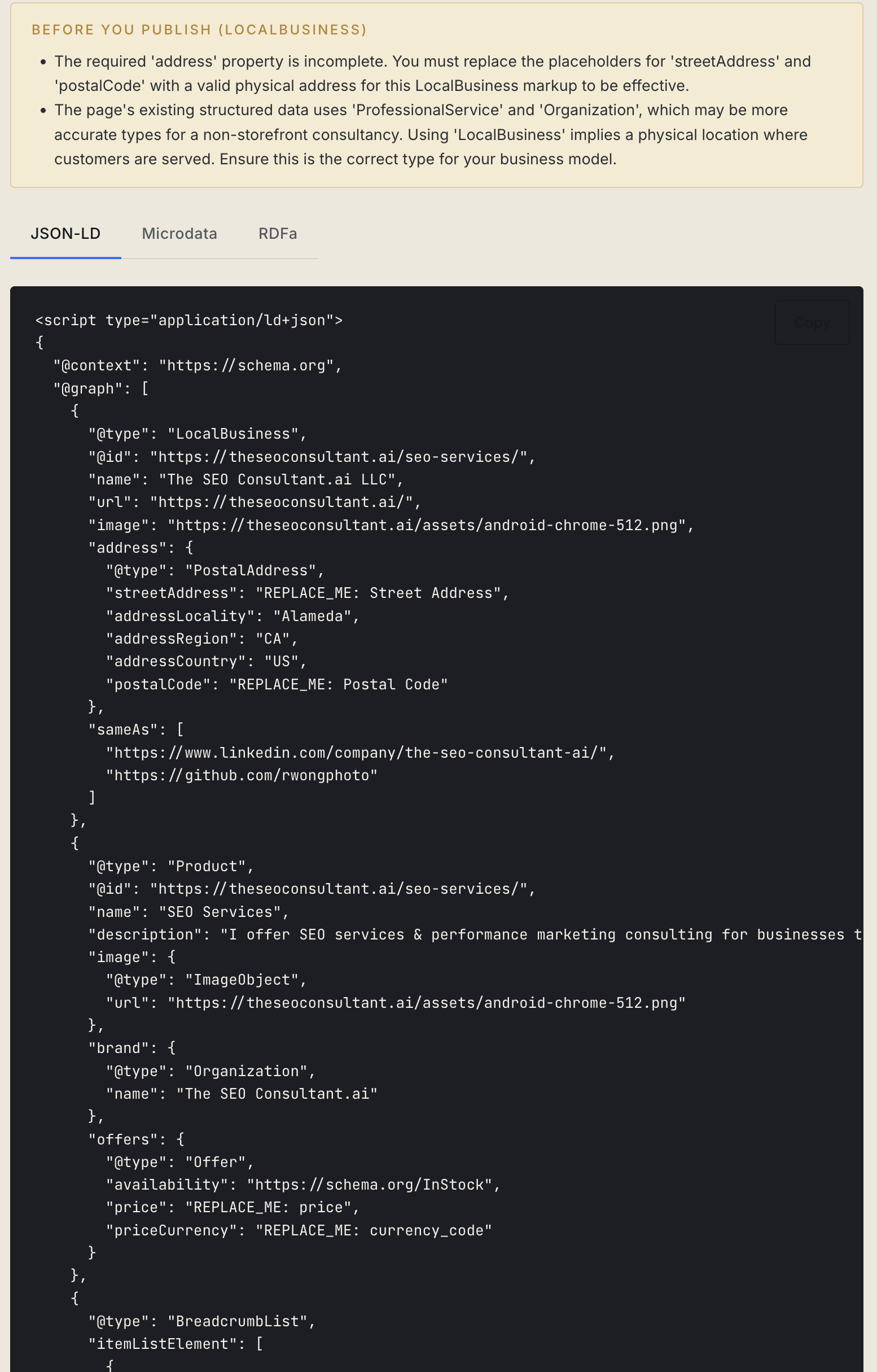
The other goal: prevent schema spam. Google has been clear for years that fabricating schema for fields that don't exist on the page is a manual-action risk. Every field this tool emits is grounded in a specific signal — title, og:image, h1, breadcrumb chain, time element, address block, price candidate. If it can't find a signal for a required field, it emits an explicit REPLACE_ME: placeholder rather than guessing.
What It Does
Six things, in order:
- Scrapes the rendered page via Firecrawl, so single-page apps are read against the DOM users actually see — not the empty shell that ships from the server.
- Extracts schema-relevant facts server-side: title, meta description, headings, OG/Twitter tags, images, addresses, phone numbers, prices, breadcrumb chains, time elements, and every JSON-LD block already on the page.
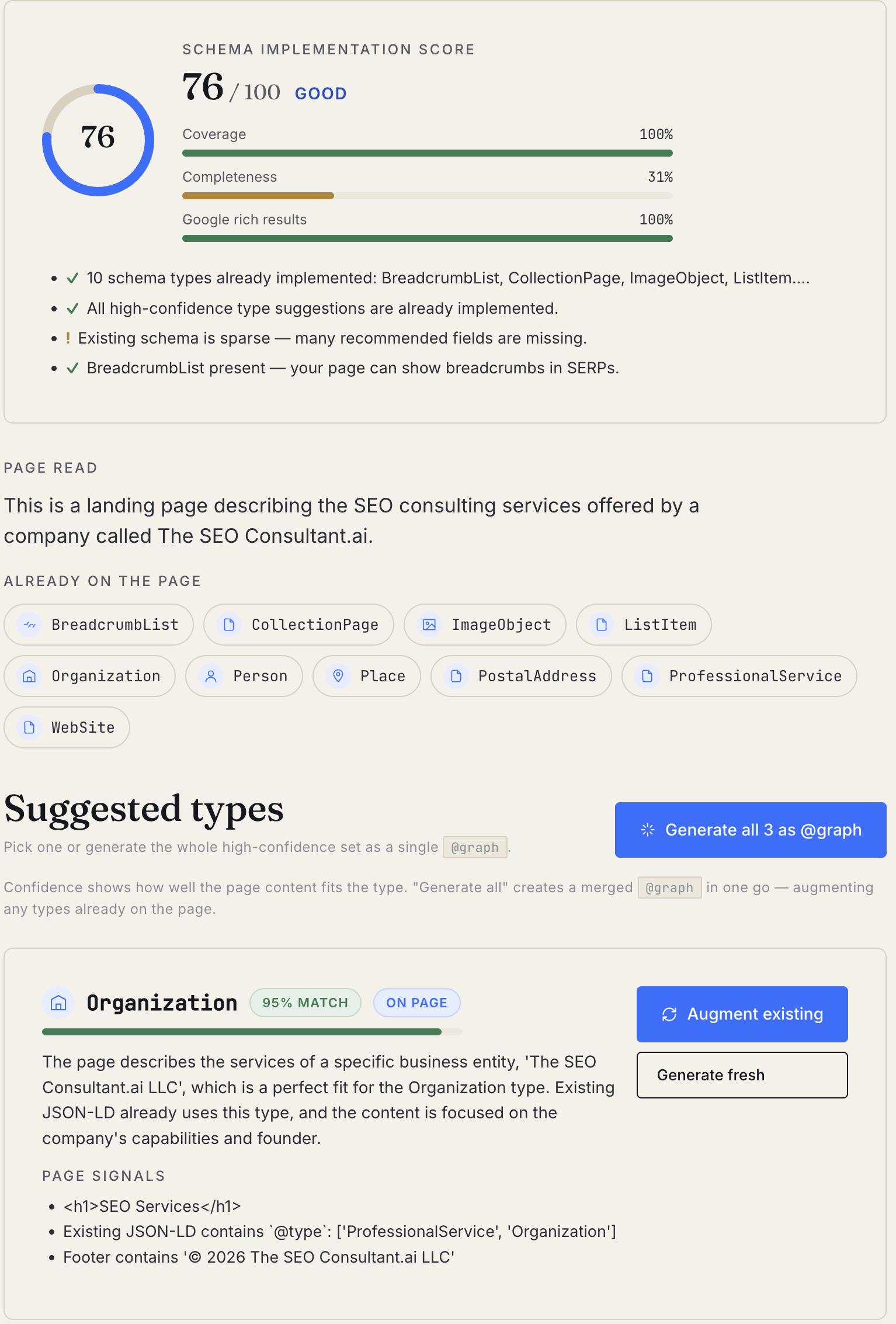
- Detects which Schema.org types fit from a 28-type allowlist, ranked by confidence with a per-type rationale and a list of page signals that fit the type.
- Scores the existing schema 0–100 across coverage (high-confidence types implemented), completeness (required + recommended fields filled), and Google rich-result eligibility.
- Generates valid JSON-LD for any type you pick — grounded in real content. If the page already has JSON-LD of that type, it augments rather than replaces.
- Validates the output against required fields, ISO 8601 dates, ISO 4217 currency codes, and type-specific structural rules (
BreadcrumbList.itemListElementmust containListItemwith position,FAQPage.mainEntitymust beQuestion+Answer, etc.).
The 28-Type Allowlist
Not every Schema.org type is worth having on your page. The allowlist is built from two sources — Schema.org's "most common types" tour, plus the types Google explicitly rewards with rich results.
- Creative works — CreativeWork, Article, NewsArticle, BlogPosting, Book, Movie, TVSeries, MusicRecording, Recipe
- Media — AudioObject, ImageObject, VideoObject
- People & places — Event, Organization, Person, Place, LocalBusiness, Restaurant
- Commerce — Product, Offer, AggregateOffer
- Reviews — Review, AggregateRating
- Page-level rich results (Google) — FAQPage, HowTo, JobPosting, Course, BreadcrumbList
The detection step uses this list as a closed vocabulary so the model can't suggest WebPage on every page or invent obscure types nobody renders.
Augment vs. Generate Fresh
When the tool finds JSON-LD of the type you've chosen already on the page, it surfaces an "Augment existing" CTA instead of "Generate." The augmented output is a strict superset: every property in the existing object is preserved verbatim — same values, same casing — and only missing required and recommended fields are added.
This matters because most CMSes (WordPress with Yoast, Ghost, Webflow) emit reasonable starter schema, but it's almost always incomplete. The right move is to fill the holes, not start over. Replacing the existing block can lose @id references, isPartOf chains, and other context the CMS already wired up correctly.
If you'd rather start fresh, there's a "Generate fresh" secondary button on the same card. Both modes leave you with a complete, valid JSON-LD object — just from different starting points.
@graph Multi-Type Generation
One BlogPosting on its own is fine. BlogPosting + BreadcrumbList + Organization + Person, all in one @graph with cross-references, is what Google actually wants. The tool supports both flows.
After generating one entity, you can add companion types one at a time — common pairings are pre-suggested for the primary type (Article suggests BreadcrumbList + Organization + Person; Recipe suggests BreadcrumbList + Person + AggregateRating + VideoObject; etc.). Each entity gets a stable @id derived from the page URL so other entities can reference it.
If you want everything at once, there's a "Generate all" shortcut on the detection screen that fires every high-confidence candidate sequentially into a merged @graph — augmenting the types already on the page in the same pass.
Validation
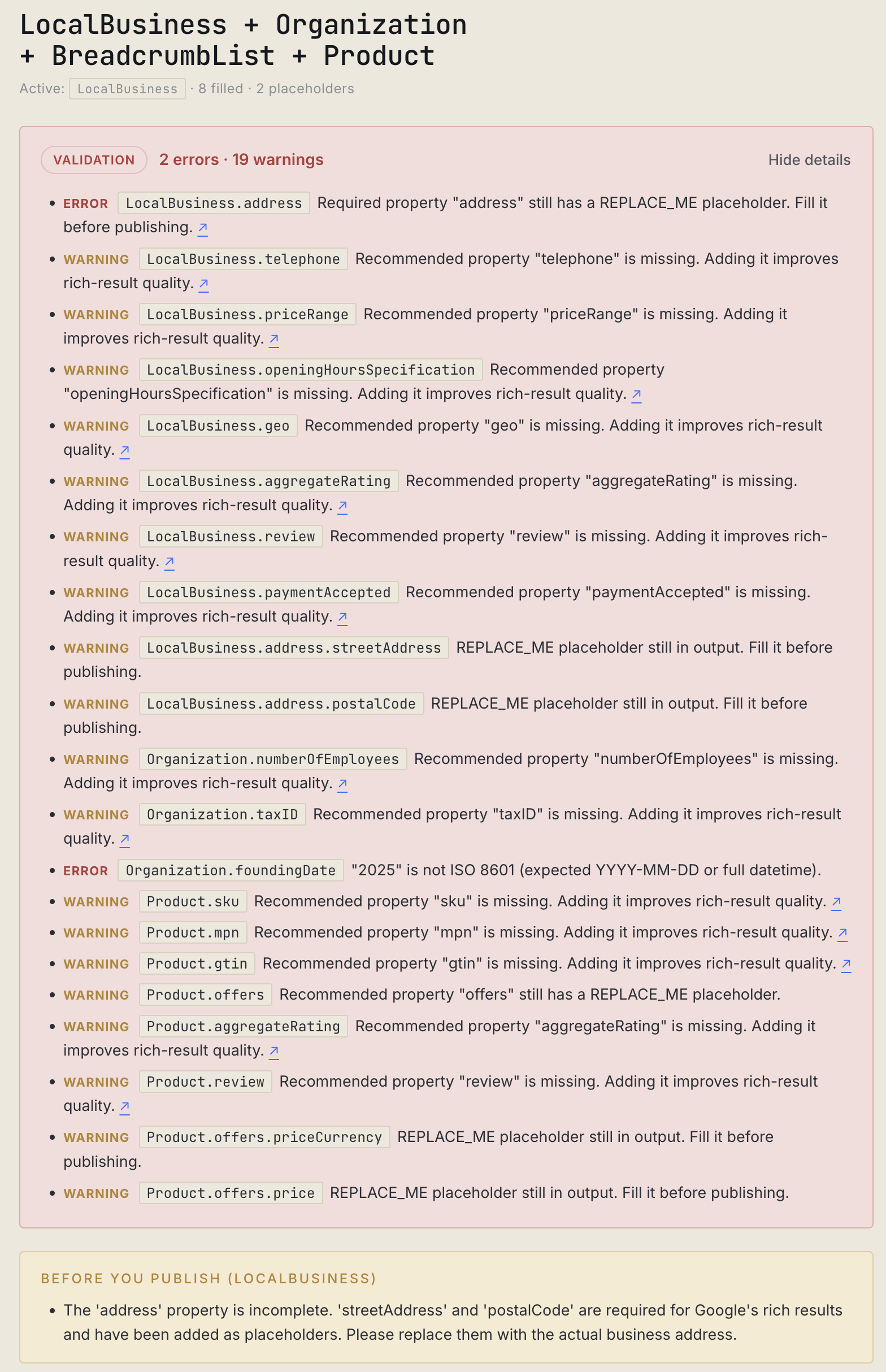
Every generation runs through a post-emit validator before it lands in the dashboard. The model gets the JSON-LD shape right most of the time, but doesn't on its own check for ISO 8601 dates, ISO 4217 currency codes, structural rules per type, or whether JobPosting.validThrough is in the past. The validator does.
Issues are tiered:
- Error. Blocks rich-result eligibility. Missing required fields,
REPLACE_MEplaceholders left in required slots, malformed dates, invalid currency codes, structural violations (BreadcrumbListitems missingposition,FAQPage.mainEntityentries that aren'tQuestion). - Warning. Schema is technically valid but Google or Schema.org strongly recommends the field. Missing recommended properties,
JobPosting.validThroughin the past, non-absolute URLs in URL fields. - Info. Cosmetic. Style nits the validator surfaces but don't affect parsing.
The result is a green "Valid" pill or a numbered list of fixable issues. Either way, you publish only what passes.
Schema Implementation Score
Above the candidate list, the tool shows a 0–100 score for the page's existing schema, broken into three sub-scores:
- Coverage — percent of high-confidence detected types that are already implemented. If the page is clearly an Article and there's no Article schema, coverage drops.
- Completeness — average fill rate of required + recommended fields across the JSON-LD already on the page. A bare
{ @type: "BlogPosting", headline: "..." }scores poorly here even though it's "present." - Google rich-result eligibility — percent of detected Google-eligible types that are present. Useful when the page should qualify for Recipe rich snippets, FAQ accordions, or Breadcrumbs and currently doesn't.
Bucketed Excellent / Good / Needs work / Poor with one-line wins and gaps below the score. The point isn't to beat the score — it's to know which sub-score is dragging the page down before you fix it.
Three Export Formats
Most teams want JSON-LD inside a <script type="application/ld+json"> tag in the page <head>. That's the default. But two other formats are valid and sometimes preferred:
- JSON-LD — drop the
<script>block into<head>as-is. The cleanest separation between markup and content. - Microdata — adds
itemscope,itemtype, anditempropattributes to your existing HTML. Useful when your CMS doesn't support arbitrary<script>tags but does let you add attributes to elements. - RDFa — uses
typeofandpropertyattributes; the W3C-standardized version of Microdata. Some legacy publishing platforms still prefer it.
The tool toggles between the three formats with a tab. The underlying data is identical; only the syntax differs. There's also a "Markdown report" export bundling all three formats plus the field notes and validation report — useful for handing to a developer who'll wire the markup in.
What It Doesn't Do
- It's not a Lighthouse replacement. No performance scoring, no Core Web Vitals, no accessibility audit beyond what schema implies.
- It doesn't run the page through Google's Rich Results Test. The output passes a private validator built from the same Schema.org and Google rules, but the canonical check is still Google's tool. The dashboard links straight to it.
- It won't generate types outside the 28-allowlist. If you need
SoftwareSourceCode,Dataset,MedicalCondition, or any of the long tail, this isn't the tool. It's intentionally focused on the types Google rewards with rich results. - It can't read what isn't on the page. If your page has no breadcrumb trail, generating
BreadcrumbListstill requires manual input. Augment-existing only works on JSON-LD that's already in the rendered DOM.
When to Use It
- After a CMS migration or theme swap. The most common time existing schema breaks — when a Yoast-managed WordPress site moves to Ghost or Webflow and the JSON-LD shape changes silently.
- Before publishing a high-stakes page. Recipe, Product, JobPosting, and Event schema all qualify for rich results that materially change CTR. A few minutes of fixes can move a page from "blue link" to "rich card with image."
- When auditing a competitor. Run their URL, see the score, see what they're missing. The detection rationale tells you which signals their content is leaning on — useful for content-strategy gap analysis.
- To generate a single comprehensive
@graphwhen the page has multiple disjoint JSON-LD blocks. Google's parsers handle multi-block pages, but a single merged graph is simpler to audit and harder to break.
Try It Now
Working With Me on This
The Schema Markup Generator is free to use. The harder part is the strategy — figuring out which Schema.org types your site should be leaning on as Google's rich-result surface keeps shifting and AI assistants rebuild knowledge graphs from your structured data. That's the kind of work the AI SEO consulting service handles. If you want me to audit your site's schema and propose the fixes, start a conversation.